Code
! pip install -Uqq kaggle git+https://github.com/huggingface/huggingface_hub#egg=huggingface-hub["fastai"]UPDATE - This project got featured in some of the cool project Jeremy Howard shared in lesson3 of fastaiv5 course.
During first lesson of Practical Deep Learning for Coders course, Jeremy had mentioned how using simple computer vision model we can build even a model to classify audio with image classification model itself.
Recently Kaggle grandmaster Rob Mulla conducted a challenge to classify music according to what genre it was. At stakes there was a RTX 3080 Ti GPU. Let’s look how we can classify music genres using a simple computer vision model which was taught in the first lesson of fast.ai.
I had already installed fastai, pytorch for training this model before hand.
! pip install -Uqq kaggle git+https://github.com/huggingface/huggingface_hub#egg=huggingface-hub["fastai"]from fastai.data.all import *
from fastai.imports import *
from fastai.vision.all import *
from huggingface_hub import push_to_hub_fastaiIn this piece of code, I will show you how you can download datasets from Kaggle in general and the datasets I had used for training model. Inorder to train models in audio, first convert the audio to a spectogram and throw an image model. Check this tweet from Dien Hoa Truong who won a NVIDIA RTX 3080 Ti GPU in this competition.
twitter: https://twitter.com/DienhoaT/status/1519785308715462656
For this competition you need two datasets:
The data provided here are over 20,000 royalty free song samples (30 second clips) and their musical genres. Your task is to create a machine learning algorithm capable of predicting the genres of unlabeled music files. Create features, design architectures, do whatever it takes to predict them the best.
The code for downloading data from kaggle has been adopted from Jeremy’s notebook
creds = ""

from pathlib import Path

cred_path = Path("~/.kaggle/kaggle.json").expanduser()
if not cred_path.exists():
    cred_path.parent.mkdir(exist_ok=True)
    cred_path.write_text(creds)
    cred_path.chmod(0o600)
path = Path("../input/kaggle-pog-series-s01e02")
path.ls()(#6) [Path('input/kaggle-pog-series-s01e02/genres.csv'),Path('input/kaggle-pog-series-s01e02/sample_submission.csv'),Path('input/kaggle-pog-series-s01e02/test.csv'),Path('input/kaggle-pog-series-s01e02/test'),Path('input/kaggle-pog-series-s01e02/train.csv'),Path('input/kaggle-pog-series-s01e02/train')]from zipfile import ZipFile
from kaggle import api
if not path.exists():
api.competition_download_cli(str(path))
ZipFile(f"{path}.zip").extractall(path)Downloading kaggle-pog-series-s01e02.zip to /home100%|██████████| 9.05G/9.05G [07:54<00:00, 20.5MB/s]! kaggle datasets download -d dienhoa/music-genre-spectrogram-pogchampsDownloading music-genre-spectrogram-pogchamps.zip to /home
100%|█████████████████████████████████████▉| 6.80G/6.80G [07:00<00:00, 14.7MB/s]
100%|██████████████████████████████████████| 6.80G/6.80G [07:00<00:00, 17.4MB/s]df_train = pd.read_csv("../input/kaggle-pog-series-s01e02/train.csv")
df_train.head()| song_id | filename | filepath | genre_id | genre | |
|---|---|---|---|---|---|
| 0 | 10150 | 010150.ogg | train/010150.ogg | 7 | Instrumental |
| 1 | 7358 | 007358.ogg | train/007358.ogg | 2 | Punk |
| 2 | 20573 | 020573.ogg | train/020573.ogg | 5 | Folk |
| 3 | 11170 | 011170.ogg | train/011170.ogg | 12 | Old-Time / Historic |
| 4 | 16662 | 016662.ogg | train/016662.ogg | 1 | Rock |
df_train["filepath"] = df_train["filepath"].str.replace("ogg", "png")Shows a highly imbalanced dataset
df_train["genre"].value_counts()Rock 3097
Electronic 3073
Punk 2584
Experimental 1801
Hip-Hop 1761
Folk 1215
Chiptune / Glitch 1181
Instrumental 1045
Pop 945
International 814
Ambient Electronic 796
Classical 495
Old-Time / Historic 408
Jazz 306
Country 142
Soul-RnB 94
Spoken 94
Blues 58
Easy Listening 13
Name: genre, dtype: int64df_train.head()| song_id | filename | filepath | genre_id | genre | |
|---|---|---|---|---|---|
| 0 | 10150 | 010150.ogg | train/010150.png | 7 | Instrumental |
| 1 | 7358 | 007358.ogg | train/007358.png | 2 | Punk |
| 2 | 20573 | 020573.ogg | train/020573.png | 5 | Folk |
| 3 | 11170 | 011170.ogg | train/011170.png | 12 | Old-Time / Historic |
| 4 | 16662 | 016662.ogg | train/016662.png | 1 | Rock |
df_train = df_train.set_index("song_id")# I noticed some of images are missing music-genre-spectrogram-pogchamps images which are in training data. So removed it
df_train = df_train.drop(
[
23078,
3137,
4040,
15980,
11088,
9963,
24899,
16312,
22698,
17940,
22295,
3071,
13954,
]
)df_train.shape(19909, 4)For creating this notebook, I spend a major portion of my time in cleaning and sorting out appropriate datablocks/dataloaders for training image models using fast.ai. This is something which you as a practitioner experience, compared to learning all the theory and backpropogation algorithm.
So let’s see how we load this data using fast.ai. There are two approaches which we will discuss below. Both the approaches of loading data works, but the first approach as a disadvantage, which I will tell in a moment.
Approach 1. Using DataBlock and loading images
temp_train and create new column is_validis_valid is default column named created for using ColSplitterget_x which specifies the path of files for inputting data which is set as base_path+filename path: lambda o:f’{path}/’+o.pathget_y which specifies the variable to predict, ie the genre of musictemp_train = df_train
temp_train.loc[:15000, "is_valid"] = True
temp_train.loc[15000:, "is_valid"] = Falsepath = Path("../input/music-genre-spectrogram-pogchamps/spectograms/")dblock = DataBlock(
blocks=(ImageBlock, CategoryBlock),
splitter=ColSplitter(),
get_x=lambda o: f"{path}/" + o.path,
get_y=lambda o: o.genre,
item_tfms=Resize(224),
batch_tfms=aug_transforms(),
)dls = dblock.dataloaders(temp_train)dls.show_batch()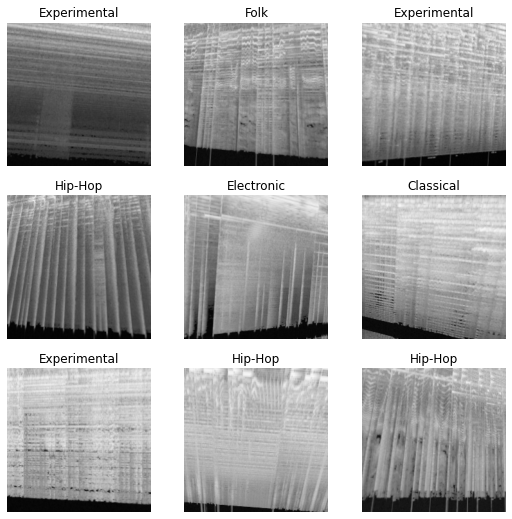
# Can be used for debugging
# dblock.summary(df_train)
This worked really well, and with this approach I was even able to train a ML model which got 50% accuracy.
twitter: https://twitter.com/kurianbenoy2/status/1520470393760272384
Yet when it came to export models, due to usage of lamda method in DataBlock. I got Pickling error as the model was not able to be exported with learn.export() method.
2. Using DataLoaders methods with loading from dataframe method
This issue got me into using approach that using ImageDataLoaders.from_df in fastai. Let’s first take a look at our df_train dataframe:
df_train.head()| filename | filepath | genre_id | genre | |
|---|---|---|---|---|
| song_id | ||||
| 10150 | 010150.ogg | train/010150.png | 7 | Instrumental |
| 7358 | 007358.ogg | train/007358.png | 2 | Punk |
| 20573 | 020573.ogg | train/020573.png | 5 | Folk |
| 11170 | 011170.ogg | train/011170.png | 12 | Old-Time / Historic |
| 16662 | 016662.ogg | train/016662.png | 1 | Rock |
If you look at the dataframe, we know that on appending to the path, the filepath column. - This is the exact value for get_x method in fastai fn_col = 1 which specifies the column name filepath at position 1. - label or get_y is specified by the column name genre at position 3. - valid_pct (ensure what percentage of data to be used for validation) - y_block=CategoryBlock to ensure it’s used for normal classification only and not multi-label
dls = ImageDataLoaders.from_df(
    df_train,
    path,
    valid_pct=0.2,
    seed=34,
    y_block=CategoryBlock,
    item_tfms=Resize(460),
    batch_tfms=aug_transforms(size=224),
    fn_col=1,
    label_col=3,
)
dls.show_batch()
I trained using a resnet18 model at first, later we stepped up to use resnet50 model.
learn = vision_learner(dls, resnet50, metrics=error_rate)learn.lr_find()SuggestedLRs(valley=0.0008317637839354575)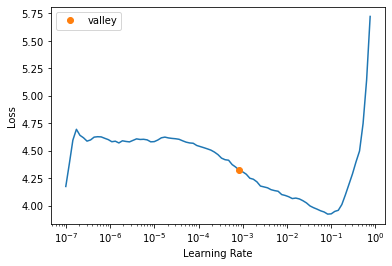
learn.fine_tune(10, 0.0008317637839354575)| epoch | train_loss | valid_loss | error_rate | time |
|---|---|---|---|---|
| 0 | 2.869285 | 2.171426 | 0.616428 | 01:43 |
| epoch | train_loss | valid_loss | error_rate | time |
|---|---|---|---|---|
| 0 | 2.312176 | 1.843815 | 0.558654 | 02:07 |
| 1 | 2.102361 | 1.719162 | 0.539061 | 02:08 |
| 2 | 1.867139 | 1.623988 | 0.527003 | 02:08 |
| 3 | 1.710557 | 1.527913 | 0.507661 | 02:07 |
| 4 | 1.629478 | 1.456836 | 0.479779 | 02:05 |
| 5 | 1.519305 | 1.433036 | 0.474253 | 02:05 |
| 6 | 1.457465 | 1.379757 | 0.464456 | 02:05 |
| 7 | 1.396283 | 1.369344 | 0.457925 | 02:05 |
| 8 | 1.359388 | 1.367973 | 0.453655 | 02:05 |
| 9 | 1.364363 | 1.368887 | 0.456167 | 02:04 |
learn.export("model.pkl")huggingface_hub has released two new functions to easily push fastai models to Huggingface Hub.
push_to_hub_fastai you can easily push the fastai Learner to huggingface.from_pretrained_fastaiOmar Espejel had shared a fantastic notebook on these new functionalities in huggingface here.
You should install git-lfs and login to huggingface account with token before pushing
from huggingface_hub import push_to_hub_fastai

push_to_hub_fastai(
    learn,
    "kurianbenoy/music_genre_classification_baseline",
    commit_message="Resnet50 with 10 epochs of training",
)
/home/kurianbenoy/music_genre_classification_baseline is already a clone of https://huggingface.co/kurianbenoy/music_genre_classification_baseline. Make sure you pull the latest changes with `repo.git_pull()`.To https://huggingface.co/kurianbenoy/music_genre_classification_baseline
390320d..3605083 main -> main
'https://huggingface.co/kurianbenoy/music_genre_classification_baseline/commit/360508311005aefeb3ca29933f2173202afe4f30'If you want to load this model in fastai and use it directly for inference just from_pretrain_fastai as shown in the below screenshot:
from huggingface_hub import from_pretrained_fastai

learn = from_pretrained_fastai("kurianbenoy/music_genre_classification_baseline")learn.show_results()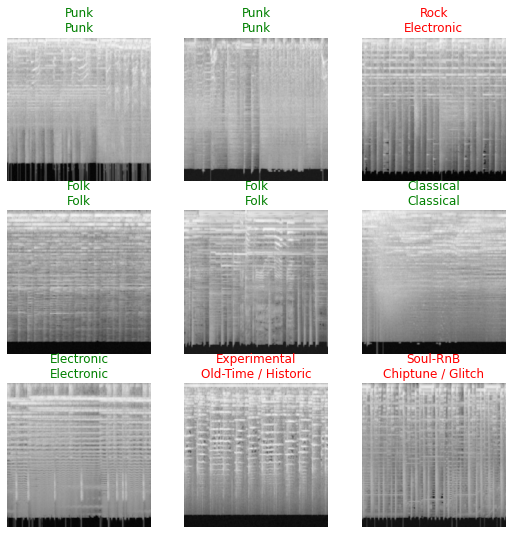
interp = Interpretation.from_learner(learn)
interp.plot_top_losses(9, figsize=(15, 10))
from fastai.vision.all import *
from huggingface_hub import from_pretrained_fastai

learn = from_pretrained_fastai("kurianbenoy/music_genre_classification_baseline")


def predict(img):
    img = PILImage.create(img)
    _pred, _pred_w_idx, probs = learn.predict(img)
    labels_probs = {labels[i]: float(probs[i]) for i, _ in enumerate(labels)}
return labels_probsWe trained a ML model which can identify with 54.4% accuracy to classify in a music file which genre it is. It’s not so bad for a baseline model. Dien Hoa Truong has shared some techniques which he learned during Kaggle competition with music genres.
Thanks for reading :pray: